Showing posts with label Tips. Show all posts

Friday, October 16, 2009

How Can You Achieve More Revenues From Adsense Ads Sharing?? Just Try This!!

1 comments
i There (-;


I get this Top list form some of improving adsense performance sites so this list will be helpful for any body how have an account in adsense but not have any sites the idea is increasing your ads on the web.....just try it,


Forums/Community
Digital Point Forums
KernalTrap.org
Work From Home Forums
IDN Forums
Domain Name Portal
NameSlot
NamePros
HostSeeker
HTTPPoint
Senserely
The Rant
SoundChilds.net
BlogUserHelp.com
TheOnlineDeveloper
Zizula Forums
ScreenDig
Webmasters.org
AuctionCUT
Blog Hosting
Cybersist
Blogger Party
My Life Of Travel
YouSayToo
HYIP Blog 
Article Directories
Xpress Ideas
Article Codex
writingUp
ArticleTrader
ArticleWise
Hot Web Tools
TechnologyParent.com
Oocuz.com
Savvify
Xomba
Other
Simpy (bookmarking)
Joomlaya (Joomlah!/Mambo)
Downline Partners (online mktg)
Rummage4Money (search)
ScratchProjects (code)
RateItAll.com(opinions)
TagTooga.com(social tagging)
Flixya(video sharing)
Swicki(custom search)
FritterWare(games)
Freerange Stock(stock photos)
MediaFlix.net(video sharing)
News And Sharings
DotNetKicks
Kick.ie
ForuMatrix


If you have any of other sites look like this list just share it in commenting box....bye (-;

Read full story

Thursday, June 11, 2009

Two Steps To Validating Your Site or Blog With "CSS, XHTML, HTML, SMIL, MathML, ....etc"

1 comments

Are you have a identical blog or website with other programming languages ?!! Yes, surly but how can i know that, All of us ask this question because both of us know the impact of programming languages and their role in the development of web page, Sites Validating with this languages have many benefits.


For example:
1- Improve the performance of your site in terms of browsing speed and organization of site parts.  
2- More compatibility with all of browsers example (IE , Firefox, Safari , Google Chrome, Folck, …etc).  
3- Validating with Programing languages makes your site more popular with search engines.
This applies to all of sites types and also this makes the process of development and modernization more easily.

Now you will learn how can check your site, There are many of ways to check any site and knowing is it conformed to programing languages or not ?? .


 ● Go to this site:
Validator.W3 - This validator checks the markup validity of Web documents in HTML, XHTML, SMIL, MathML,... etc.


Validate By URL :
• In this option you can check your site or any site by copy/paste direct URL ex: www.Yoursite or any site.com,org,net,info, ... etc.


Validate By FileUpload :
• In this option you
should upload your source code file ex:(index.html,index.xhtml) to the site "This option is useful for web designers and developers to know under construction sites errors".

Validate By Direct Inbut :
To do your checking in this option you should copy/paste all of source codes in the place of writing code area .

These type of sites provide unique service in that it found errors and corrected. If you got a good result you should see this result :


- now we finish checking about Xhtml, Html.


Go to this site :

W3C.Validator:This validator checks the markup validity of Web documents in Check Cascading Style Sheets (CSS) and (X)HTML documents with style sheets. 
 If you see the second site is too similar than with the first site never mind just your checking.

After checking and if your resualt have a few errors just fix them and should see this image:


Well done, Have fun (-;
Read full story

Friday, June 5, 2009

All Of Us Must Supporting "She Told Me.com"Make More Money

1 comments
Hi All i writing this post to support She Told Me this cool site, So What does this site Present???, This site presenting a cool service and earning money that help you to share your ideas to others to achieve more traffic and popularity to your page and surly making money.


So i'll show today how can you get benefits from this site just add this button and link this button with your referral link after you signing up so just go there and sign up to get your referral link:

Signing Up Link

After registering you can submit your posts&articles and you can make money from sharing adsense ads 'Read More About This'.

Second step add this button to your site and have more referral pointes:
Button preview:


<a target="_blank" href="YOUR REFERRAL LINK HERE"><img border="0" alt="SheToldMe.com" src="http://i39.tinypic.com/2webgif.png"/></a>

Have Fun And Well Done (-;
Read full story

Tuesday, June 2, 2009

How To Add Javascripts Directly Without Javascript Hosting "For Blogger Users"

4 comments
Many of the bloggers who's blogging for programming posts don't have javascript hosting site to upload any javascript file to order any javascript code so i found two methods to solve your javascript code to add in your blogger template or what you want.

 
In the first method is we add some changes in javascript source code before adding it for example any js code must look like this:

<script type="text/javascript" src="Javascript file.js">
bla, bla, bla

</script>
All you will do just copy all the content of the Javascript file.js and then copy in this new javascript code:
<script type='text/javascript'>
//<![CDATA[
SCRIPT_CONTENT
//]]>
</script>
The second method also you can upload Javascript file.js but in TXT format not JS format and put the new link look like this:
<script type="text/javascript" src="Same js but in new format.TXT" /> 
</script>
Read full story

Sunday, May 24, 2009

List Of Top 100 Highly PageRank Forums 'Get More Traffic'

0 comments
Human beings are social by nature, and online communities or forums are the latest in a long progression of social organizations created by humankind, While many people join forums specifically for the social benefits, there are several good reasons for Internet entrepreneurs to join an online forum, The top reason many Internet business users join forums is for the search engine benefits.
I have compiled this list due to each of us needs to join a forum every day ,Me and you and others need to more Publicity and increase traffic rank also making progress in pageRank level.

http://forums.digitalpoint.com
http://www.sitepoint.com/forums
http://www.webmasterforums.com
http://www.allcoolforum.com
http://www.warriorforum.com
http://forums.webicy.com
http://thehyipforum.com
http://www.webmasterforumsonline.com
http://www.webmasters.am/forum
http://www.webmasterforums.net
http://www.devhunters.com
http://www.webmaster-forum.net
http://www.geekvillage.com/forums
http://www.zymic.com/forum
http://www.webmastershelp.com
http://www.webmasterdesk.org
http://www.webmasterground.com
http://developers.evrsoft.com/forum
http://www.websitebabble.com
http://www.talkingcity.com
http://www.australianwebmaster.com
http://www.wtricks.com
http://www.forums.webzonetalk.com
http://www.htmlforums.com
http://www.searchbliss.com/forum
http://www.webmasterize.com
http://www.webmasterserve.com
http://www.freehostforum.com
http://www.seorefugee.com/forums
http://www.cre8asiteforums.com/forums
http://forums.seo.ph http://forums.delphiforums.com
http://www.web-mastery.net
http://www.webworkshop.net/seoforum/index.php
http://www.webproworld.com
http://www.bzimage.org
http://www.v7n.com/forums
http://www.dnforum.com
http://www.webcosmoforums.com
http://forums.webicy.com
http://forum.hittail.com/phpbb2/index.php
http://www.affiliateseeking.com/forums
http://siteownersforums.com/index.php
http://www.webmaster-forums.net
http://www.geekpoint.net
http://www.smallbusinessforums.org
http://forums.ukwebmasterworld.com
http://www.experienceadvertising.com/forum
http://opensourcephoto.net/forum
http://forums.seochat.com
http://forums.searchenginewatch.com
http://www.ihelpyou.com/forums
http://dishnews.medianetwork.co.in/yabb2/YaBB.pl
http://www.businesss-forum.com
http://www.9mb.comhttp://forums.seroundtable.com http://www.submitexpress.com/bbs
http://www.startups.co.uk/6678842908486596004/forums.html
http://www.webmaster-talk.com
http://forums.comicbookresources.com
http://www.clicks.ws/forum/index.php
http://www.acorndomains.co.uk
http://forums.onlinebookclub.org
http://www.ableton.com/forum
http://www.davidcastle.org/BB
http://www.webtalkforums.com
http://www.bloggapedia.com/forum
http://www.bloggertalk.com/forum.php
http://paymentprocessing.cc
http://www.directoryjunction.com/forums
http://www.internetmarketingforums.net
http://www.lex224.com/forums/index.php
http://forum.joomla.org
http://forum.mambo-foundation.org/index.php
http://www.simplemachines.org/community/index.php
http://www.namepros.com/index.php
http://loanofficerforum.com/forum
http://iq69.com/forums http://forum.hot4s.com.au
http://forums.mysql.comhttp://forums.amd.com/forum http://softwarecommunity.intel.com/isn/Community/en-us/Forums http://forums.cnet.comhttp://seotalk.medianetwork.co.in https://www.computerbb.orghttp://forum.vbulletinsetup.com http://www.irishwebmasterforum.comhttp://www.app-developers.com http://forums.stuffdaily.comhttp://forums.seo.com http://www.webdigity.comhttp://www.inboundlinksforum.com http://forums.gentoo.orghttp://ubuntuforums.org
http://forum.textpattern.com http://talk.iwebtool.com
http://www.frogengine.com/forum http://www.capitaltheory.com
http://www.smsbucket.com/forums/

Have fun and leave your comment...bye
Read full story

Wednesday, May 20, 2009

3 Tricks To Placement Your Adsense Code In The Content Of Your Posts ?!!

5 comments


All of us believe in Google Adsense ads is knowing where to place the ads. In this guide, we shall discuss the modification you can make to your Blog template to have your Google AdSense ads appear between your post title and post body, or between your post body and post footer. Also, we shall have the AdSense ads appear on every individual post.


• Many people believe that having AdSense ads just before or after the Blog posts will best optimize their performance. For the purposes of this article and to give you an idea how it would look, we have inserted the AdSense code into our template to have the ads appear immediately below the article and before the post footer. If you think you would like to do the same for your Blog, the following are the steps you should take.


• Choosing a best placement for your AdSense ads will attract more attention
and will certainly impact on the revenue of Ads so i got this 3 ways to improve your ads locations.

I will explain the 3 tricks and after finish i will show you the differences between them.

The 1rst Trick (adding the ads in the posting box):

Follow this steps given below:
-----------------------------------------
1- Log in into blogger with you ID
2- Go to "Settings" >>>"Formatting"
3- Change "Convert line breaks" from (Yes) to (No) and saving your settings.
-----------------------------------------

Now you need to go to posting your topic that will include adsense code how can add the code just copy and paste this code any where you want in the post content :

Code:


After finish your posting included ads code sure your ad will appear in the place you have chosen.

#Tip-"You can add this code every where you want in the blogger post just for example you can add ads in the beginning of post content or put ads in the middle or put it in the end of post you just chose the best places of your content to achieve more click on the ads".


The 2ond Trick (ordinary way by blogger feature):

- Use This Google Feature:
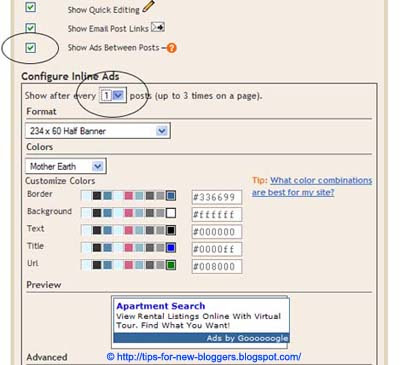
Go to Template -> Page Elements and you see in your layout the heading “Blog Posts”. Click the “Edit” link at the bottom right corner. You will see this screen.


Click on check for the “Show Ads Between Posts” You can change placements to show ads after every post or after several posts. In accordance with AdSense Terms, a maximum of 3 Ads will be shown, Customize the ad format and size, color scheme. Save the changes and refresh your Blog to see the Ads.


The 3rd Trick (ads code editions):

- Some Changes For Ad Code and locations:
All we have to do now is to add some changes for your adsense code,all we have to change is converting some of the characters in beginning and ending of the code look like change this signs (>,<,") with other characters follow how you can do this :

Change the html signs to creat your Edition code in this New Signs in this Txt :


for example look in this screen:


Your
Edition code must copied in this code i will named it Y:


After editing your adsense code open your dashboard, Go to Template -> Edit HTML -> Click the "Download Template" link to backup the template to keep your template additions then click check for “Expand Widget Templates”.

Now search for post.body(data:post.body) through your browser's search function (Ctrl+F for Firefox or IE).

Find this code:


If you want the ads appear above post content, just add your Edition code above the previous code ,Also if you like to add Adsense ads below the content of post just do the opposite.


#Tip-
"Choose the smallest AdSense formats look like 125x125 or 468x15 to keep the regularity of your post content, You can change your ads Float from left to right or center".

- Set Ads Margins & Padding
(Styling Code Y ) :
If the AdSense ads appear too close to the edge, To give you an idea how wide the margin should be you can set margin to 30px so the new Y code will be after adding margin-left:30px :


Or you want to align the AdSense ad to your text, you can set a margin or padding around the entire AdSense code the new Y code will be after adding
margin-left:5px 10px 15px 20px :


5px
: is for the top margin
10px : is for the right margin
15px : is for the bottom margin
20px : is for the left margin

Preview the template and if you are satisfied, save the template and refresh your Blog to see the new placements of your AdSense ads.

• The Differences between this tricks

-The First Trick :
Ads appear in one post and not appear in other messages because we add the code in the posting box html not in the html of your template.


-The Second Trick
:
In this not trick but this is a feature opition for any beginner user so this option show ads after any of your posts so this no useful for the cost of your Adsense clicks.

-The Third Trick
:
Ads appear in any of your posts and this trick let you add ads any where of the post content so it is the great trick for your to increase the Adsense revenue

Read full story
 
http://www.wikio.com Blog Search Web Design Directory of Web Development Blogs Top Marketing SEO  blogs Hit It! blog search directory podcast directory Free Trial of Our Professional Search Engine Submission Service Blog Directory

Hello


BProfile

My photo
Be Hungry For Success.

Followers

^^^Back to Top Page^^^